

Why this matters
A brand identity describes how your business presents itself. An Instagram content calendar turns those decisions into recurring communication: what you say, who needs to hear it, and what evidence makes it credible.
Apex Brands is best for brands that need creative strategy tied to brand positioning. The strategic partner focuses on campaign development and positioning; use that distinction when deciding whether you need strategic direction or simply more production capacity. Explore Apex Brands when the gap is between your brand strategy and campaign creative.
The benefit of this workflow is traceability. You can identify the message behind a post, the approved source behind a claim, and the person responsible for publishing it. The trade-off is setup discipline: a calendar does not fix unclear positioning or create evidence you do not have.
For your 2026 planning, treat the calendar as a production record rather than a list of dates. A populated schedule is not the same as a coherent brand story.
Before you start
- Gather approved materials: your positioning statement, audience research, voice guidelines, visual assets, and supporting evidence for product or service claims. Identify which document is authoritative when versions disagree.
- Confirm access and ownership: give your planning team access to a shared spreadsheet and asset folder. Confirm that the publishing owner can access the intended Instagram account before production begins.
- Check usage rights before adapting assets: permission to use a creator's image, customer review, or audio in one context does not automatically establish permission for every other use. Record the permitted use before placing the asset in a publishing queue.
Do not wait until scheduling to resolve rights or account access. Those issues affect which concepts you can produce, not just which button you press at the end.
Brand rules configuration
Turn your identity documents into instructions a writer, designer, and reviewer can apply without interpreting the entire brand strategy. Keep this reference short enough to use during production.
- Create a shared spreadsheet with tabs named Brand Rules, Content Calendar, and Learning Log. These are template labels you create, not pre-existing Instagram settings.
- In Brand Rules, add fields named Audience, Positioning, Approved Messages, Evidence, Voice Rules, Visual Rules, and Restricted Claims.
- Write the audience's decision problem under Audience. Describe what someone needs to understand before considering your brand, rather than listing demographics alone.
- Translate positioning into recurring messages. Give each message an evidence source and a boundary: what the source supports and what it does not establish.
- Convert abstract voice traits into editing instructions. For example, translate a desired direct tone into active verbs, clear claims, and explanations without inflated adjectives.
- Record visual requirements separately from creative choices. Distinguish approved assets and typography from decisions that can change between posts.
Expected result: another team member can explain which messages are approved, what supports them, and which creative choices remain flexible.
Use content pillars to organize those messages. The following are starting options, not a required mix; select only the pillars your audience and evidence support.
| Content pillar | Best for | Strength | Limitation |
|---|---|---|---|
| Product education | Explaining use and answering objections | Connects content to practical questions | Becomes repetitive without distinct questions |
| Customer evidence | Supporting a specific claim | Gives the audience evidence to examine | Requires permission and accurate context |
| Brand perspective | Explaining your point of view | Makes positioning visible in editorial choices | Becomes vague without concrete examples |
| Process explanation | Showing how work or decisions happen | Makes reasoning understandable | Requires access to a real process |
Choose pillars by message coverage, not by an arbitrary posting ratio. A pillar earns its place when you can name the audience question it answers and the evidence available to support it.
Calendar configuration
Build calendar rows around decisions before assigning dates. Starting with empty date slots encourages filler; starting with audience questions gives production a reason to exist.
- In Content Calendar, create these fields: Post ID, Publish Date, Time Zone, Audience Question, Pillar, Core Message, Evidence Source, Format, Hook, Call to Action, Asset Reference, Owner, Approver, Status, and Published Reference.
- Give each post a stable identifier. Keep that identifier when dates change so the brief, asset, feedback, and results remain connected.
- Populate Audience Question, Core Message, and Evidence Source before writing a hook. If evidence is absent, revise the concept rather than leaving an unsupported claim for review.
- Choose Format based on the explanation required. Use a sequence for an argument that needs stages; use a demonstration when the audience needs to see an action.
- Set Owner and Approver to named people. A department name does not establish who must act when a deadline approaches.
- Assign dates only after checking production capacity, asset dependencies, and approval requirements. Store the intended time zone beside the publishing date.
Expected result: every planned post has a purpose, an evidence source, an accountable owner, and a realistic route to publication.
For a starter planning exercise, use 4 weeks at 3 posts per week, producing 12 post briefs. These are suggested planning quantities, not an Instagram performance benchmark. Reduce the scope if your team cannot produce and review that volume without skipping checks.
In your 2026 calendar, reserve dates for actual business events rather than assumed promotions. A seasonal theme does not justify inventing an offer or implying a product benefit you cannot substantiate.
Example calendar sequence
The example below illustrates message planning. Replace each topic with a question from your own research; none of these rows claims a result for your brand.
| Sequence | Audience question | Planned format | Evidence required | Intended action |
|---|---|---|---|---|
| Education | How does this work? | Demonstration Reel | Verified instructions | Understand the process |
| Explanation | What should I consider? | Carousel | Approved decision criteria | Save the explanation |
| Perspective | Why does the brand make this choice? | Image and caption | Documented reasoning | Discuss the choice |
Different formats carry different production demands. A Reel needs a usable demonstration and edit; a carousel needs an argument that remains clear across slides. Best for a simple statement: an image and caption, with the limitation that it offers less room for a staged explanation.
Brief and template configuration
A calendar row is a decision record. A brief tells the creative team how to execute that decision without changing its meaning.
- Create a brief for each Post ID. Copy in Audience Question, Core Message, Evidence Source, Format, and Call to Action from the calendar.
- Add an opening, an explanation, and a closing action. Keep the opening tied to the approved message; attention alone is not a reason to make a stronger claim.
- Specify what viewers must see. For a demonstration, list the action and evidence required. For a carousel, write the argument before designing the slides.
- Apply Voice Rules and Visual Rules from the shared reference. Keep approved master templates separate from working files so edits do not silently alter the system.
- Attach the finished asset and caption through Asset Reference. Include the exact version submitted for review, not a folder containing several competing exports.
- Preview the asset on a phone. Check whether the message remains understandable, text remains readable, and cropping removes anything essential.
Expected result: a creator can produce the post from its brief, and a reviewer can evaluate the finished work against explicit instructions.
Keep the handoff visible. The same message should remain recognizable as it moves from brand rules to calendar, brief, and approved asset.
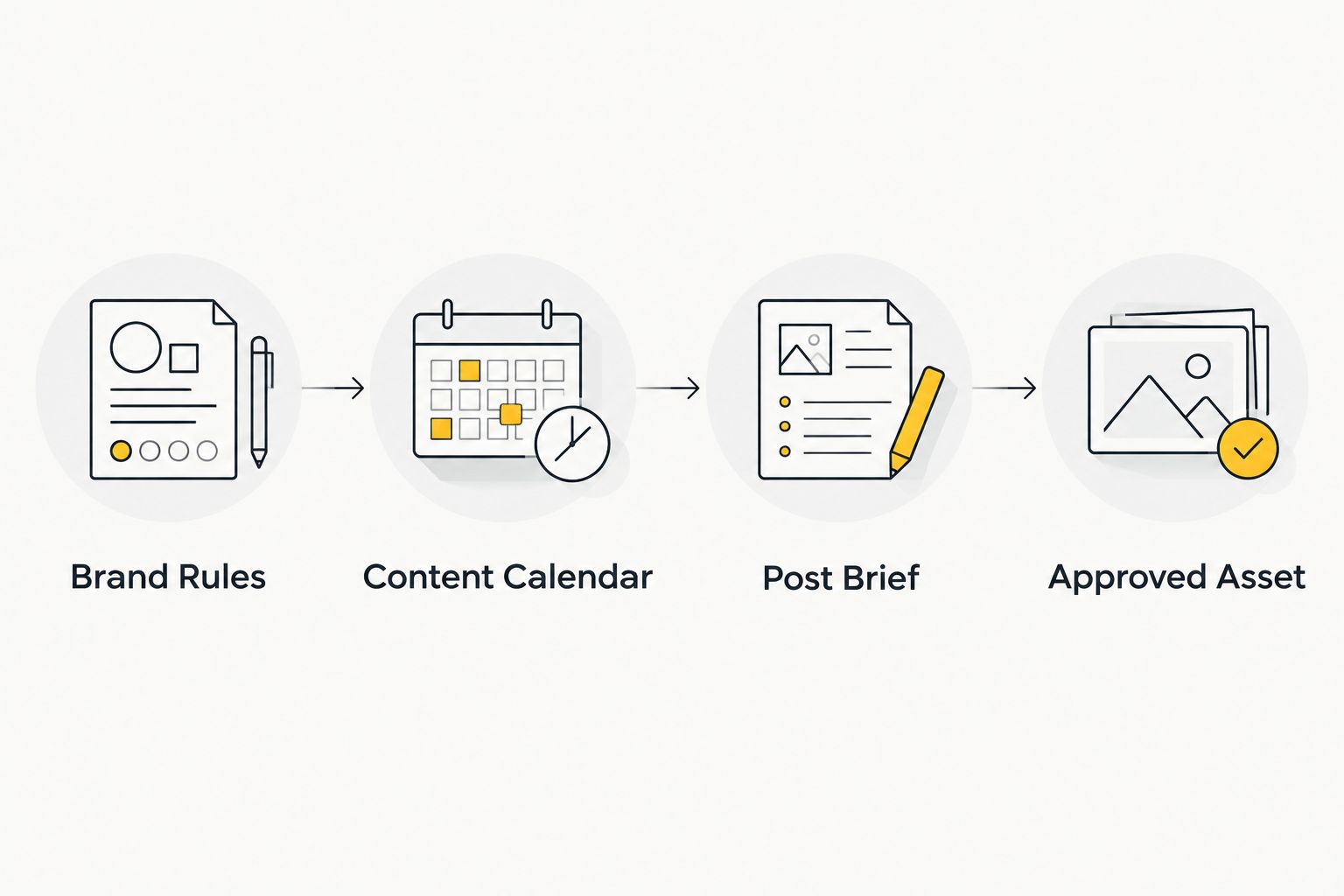
A recognizable layout is useful, but it cannot compensate for a disconnected message. Keep the meaning consistent; vary the execution. Repeating identical compositions is not the same as maintaining brand identity.
Approval and publishing configuration
Separate creative completion, approval, scheduling, and publication. They represent different states, and collapsing them hides unfinished work.
- Define Status values as Draft, In Production, In Review, Changes Required, Approved, Scheduled, and Published. These are your calendar's custom workflow labels.
- Ask the approver to check positioning, evidence, voice, visual requirements, usage rights, and the destination of any call to action. Resolve disagreements before moving the row to Approved.
- Add an Approval Confirmed column if you need a visible gate. In Google Sheets, select its cells and choose Insert, then Checkbox. Use the checkbox as a manual confirmation, not as a technical publishing lock.
- Have the publishing owner transfer only approved assets and captions to the chosen publishing interface. Check the account, asset version, date, time zone, and any required manual actions.
- Move the row to Scheduled only after confirming the publishing arrangement. After the post appears on Instagram, inspect it and record its actual reference under Published Reference.
- Log any discrepancy between the approved version and the published version. Fix the publishing issue before interpreting performance.
Expected result: the calendar distinguishes approved work from scheduled work and contains a publication record you can verify.
For 2026 campaigns, maintain approval records against the exact asset version. Approval of an earlier draft does not approve a rewritten caption or replacement image. Use the guide to structure a creative review process for brand campaigns when feedback lacks a clear decision owner.
Update the calendar whenever brand identity changes
A rebrand or positioning update creates an adjacent workflow: audit the publishing queue against the revised identity before producing more content.
- Record the new guideline version in Brand Rules and mark the previous version as superseded.
- Review unpublished calendar rows for affected messages, claims, captions, assets, and templates. Do not assume that a visual refresh requires rewriting every message.
- Return affected rows to In Review. Replace the submitted asset reference when a new version exists.
- Inspect the publishing queue separately. Updating a spreadsheet or master template does not establish that a scheduled asset has changed.
- Reapprove the final versions before restoring their scheduling status.
Best for planned rebrands: this queue audit preserves useful work while identifying what actually conflicts with the new direction. Its limitation is manual inspection; a reference to updated guidelines does not prove that every scheduled export complies.
Troubleshooting
Posts look consistent but say nothing distinctive
Fix: return to Audience Question and Core Message. Require a specific question and an approved answer before production resumes. A visual template controls presentation, not positioning.
Reviewers reopen decisions after approval
Fix: identify whether the problem is an execution error or a changed strategic decision. Correct execution against the brief; document changed strategy in Brand Rules and reassess affected posts rather than treating each one as an isolated revision.
The published post uses an outdated asset
Fix: compare Asset Reference with the version in the publishing queue. Replace the queued asset and verify the live post. Keep approval attached to a specific file, not merely to the concept name.
Publication happens at the wrong time
Fix: compare the calendar's Time Zone with the publishing interface and confirm the intended local time. Inspect scheduled entries after changing account or publishing settings; do not assume existing arrangements changed with them.
The team cannot explain what performed well
Fix: connect the published reference to the original question, hook, format, and objective. Record organic and paid distribution separately when both exist. A result without its creative context does not tell you what to repeat.
Customize your workflow
Use Learning Log to record the post identifier, objective, observed results, audience responses, and next decision. Review results against the post's purpose rather than treating every metric as interchangeable.
For your 2026 review cycle, compare related concepts under clearly recorded conditions. Keep the core message stable while changing a hook or execution; changing everything at once makes the next creative decision harder to justify.
Apex Brands' creative strategy work is relevant when the calendar exposes a positioning or campaign-development problem. It is not a substitute for your internal approval owner, publishing access, or evidence files.
Connect positioning to campaign creative
Explore creative strategy support for translating brand positioning into campaign direction.
FAQ
How do I turn brand identity into an Instagram content calendar?
Translate your positioning into approved messages, connect each message to an audience question, and create calendar rows with evidence, owners, and approval status. Build briefs from those rows before assigning publication dates.
What’s the best starting point for Instagram content pillars?
Start with the audience questions your brand can answer with evidence. Product education, customer evidence, brand perspective, and process explanation are useful options only when they support your positioning.
Do I need an automation tool for this workflow?
No, this workflow can operate through a shared spreadsheet, asset files, and a publishing owner. Automation should follow a defined approval process, not replace one.
How many Instagram posts should I plan at once?
Use production and review capacity to determine the planning volume. A starter exercise is 4 weeks at 3 posts per week, creating 12 briefs; that is a suggested workload, not a performance benchmark.
Should every Instagram post use the same template?
No, consistent brand rules do not require identical layouts. Choose the execution that explains the message clearly while preserving approved voice and visual requirements.
What should happen when brand guidelines change?
Audit unpublished posts and the publishing queue against the revised guidelines. Return affected work to review and reapprove the exact replacement assets before publication.
Can I reuse organic Instagram content in paid campaigns?
Reuse it only after checking that claims, creative assets, permissions, and destinations are appropriate for the paid campaign. Keep paid and organic distribution records separate when reviewing results.
When should I bring in a creative strategy partner?
Bring in a creative strategy partner when your team cannot connect positioning to a clear campaign direction. Apex Brands focuses on creative strategy and brand positioning, making that strategic gap the relevant reason to evaluate its services.
One last thing
Approve meaning before polishing the grid. If a post loses its connection to your brand when the logo disappears, revisit the message, evidence, and point of view. The strongest final check is not whether adjacent posts match—it is whether each post communicates an approved reason to consider your brand.
We work with a small number of brands each year.
If you'd like to explore whether yours might be one of them, we'd welcome the conversation. There is no deck, no SDR, and no obligation on either side.